Most discount codes lose money quietly.
The code works, the sale happens, and nobody checks what the discount cost. This guide shows how Shopify discount codes work, how to set one up in about five minutes, what stacks with what, and how to give a discount without wiping out your profit.
We built the facts below from Shopify's own Help Center pages, read on 17 November 2026, and from Baymard Institute's cart abandonment research. Where a number is our own arithmetic, we say so.
What Are Shopify Discount Codes and How Do They Work?
A Shopify discount code is a text string, such as WELCOME10, that a customer enters at checkout to receive a reduction you have defined. Shopify allows up to 20,000,000 unique codes per store, and a code can be limited by date, usage count, minimum order and eligible products (Shopify Help Center).
You create the code in your Shopify admin and decide what it does. The customer types it in at checkout, and Shopify checks the rules you set before it takes anything off.
According to Shopify's documentation on discount codes, each code can be configured with:
- the dates it is valid
- how many times it can be used
- a minimum order amount
- which products, collections or variants it covers
- whether it combines with other discounts
Codes work in your online store and in person if you use Shopify POS. The Sales by discount report then shows how often each code is used.
There is one catch, and Shopify states it plainly. Discount codes can create a sense of exclusivity and urgency, but "forgotten discount codes might lead to cart abandonment." A shopper who has a code and cannot find where to paste it is a shopper who leaves.
Which Shopify Discount Type Should You Choose?
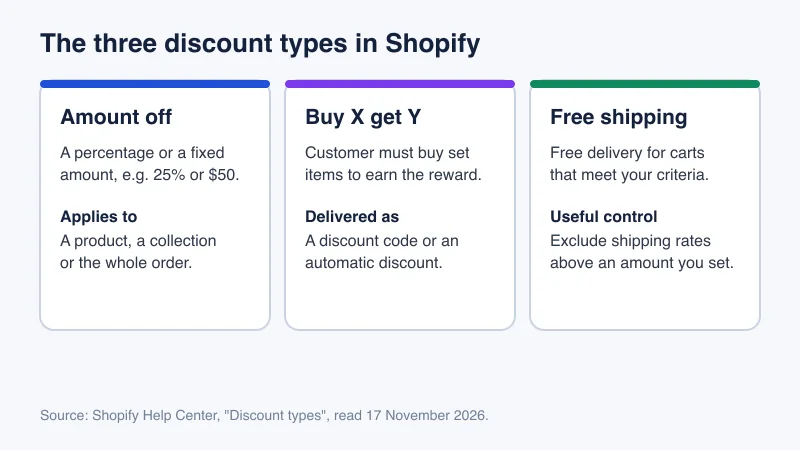
Shopify offers three discount types: amount off (a percentage or fixed sum on products or the whole order), buy X get Y, and free shipping. Amount-off examples in Shopify's documentation include 25% or $50. Buy X get Y can run as a code or automatically (Shopify Help Center, "Discount types").
Pick the type by the behavior you want, not by the biggest number you can offer.
| Goal | Best Shopify discount type | Why |
|---|---|---|
| Win a first order | Amount off the order (percentage) | Easy to understand, easy to put in an email |
| Raise cart size | Buy X get Y | The shopper must add something to earn it |
| Remove a shipping objection | Free shipping | Targets the cost shoppers most often object to |
| Clear one slow product | Amount off a product or collection | Limits the margin you give up |
| Reward loyal customers | Amount off, limited to a customer segment | Keeps the offer away from everyone else |
Need tiered discounts, such as 10% off $75 and 20% off $150? Shopify says these need either a discount app from the Shopify App Store or, on Shopify Plus, Checkout Blocks. Our guide to the best Shopify discount apps compares the options, and our quantity discount guide shows a code-free way to do volume pricing.
Should You Use a Discount Code or an Automatic Discount?
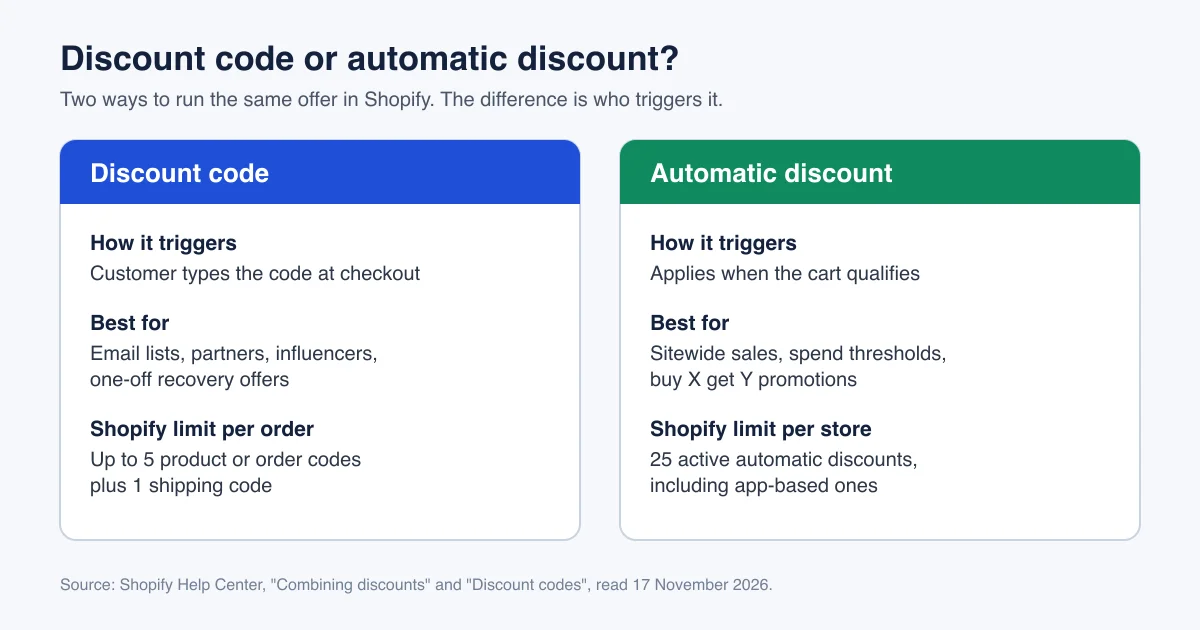
Use a discount code when you want to control who receives the offer, such as an email list or an influencer audience. Use an automatic discount when every qualifying cart should get it without typing anything. Shopify caps active automatic discounts at 25 per store, including app-based discounts (Shopify Help Center).
The difference is who triggers the discount. With a code, the customer does. With an automatic discount, the cart does.
Codes fit targeted traffic. If you send WELCOME10 only to new subscribers, only they have it. You can also track which channel the code came from, because each code shows up in the Sales by discount report.
Automatic discounts fit offers you want everyone to see: a sitewide sale, a spend-$100-get-free-shipping threshold, a bundle deal. Nobody has to hunt for a code. That matters because forgotten codes are a cart abandonment risk, as Shopify notes.
A simple rule from our reading of the docs: if you would be happy for any visitor to get it, make it automatic. If it is a reward for a specific audience, make it a code.
How Do You Create a Shopify Discount Code Step by Step?
Go to Discounts in your Shopify admin, click Create discount, choose a type, set the code name, value, eligibility, minimum requirements, usage limits, combinations and dates, then save. Shopify's documentation advises against special characters in the code name so the code works correctly in checkout URLs.
Here is the setup in order. Allow five minutes for the first code.
- Open Discounts. In your Shopify admin, go to Discounts and click Create discount.
- Choose the type. Pick amount off products, amount off order, buy X get Y or free shipping.
- Choose the method. Select Discount code (not Automatic discount) and type the code, or let Shopify generate one.
- Set the value. Enter a percentage or fixed amount. Use at least 1% or $0.01. Shopify warns that $0 and 0% discounts might not work correctly at checkout.
- Set who can use it. Limit it to products, collections, specific customers or a customer segment. A code can apply to up to 100 specific customers, products and variants.
- Add a minimum purchase. A minimum order amount protects your margin on small baskets.
- Cap the use. Set a total use limit, or one use per customer, for single-use offers.
- Choose combinations. Decide whether the code can combine with product, order or shipping discounts. Only tick the classes you have tested.
- Set the dates. Your admin time zone decides the start and end time. If your store is on Eastern time and you pick November 26, the code starts at 12:00 a.m. Eastern.
- Save and test. Add an eligible product to a cart in a private browser window and enter the code. Check the cart total, then check the order confirmation.
Two quirks catch people out. First, you cannot change a discount's type or method after creating it; you must delete it and rebuild it. Second, a customer who applies a code at checkout will not see it apply to post-purchase offers, because discount codes cannot be applied on the post-purchase page.
Does this sound like your store? You send codes, but shoppers still leave at the checkout step. Show your active code on the page where they decide. Browse LiquidBoost's Promo Code Display snippet. One-time purchase, 14-day money-back guarantee.
How Do Shopify Discount Codes Stack?
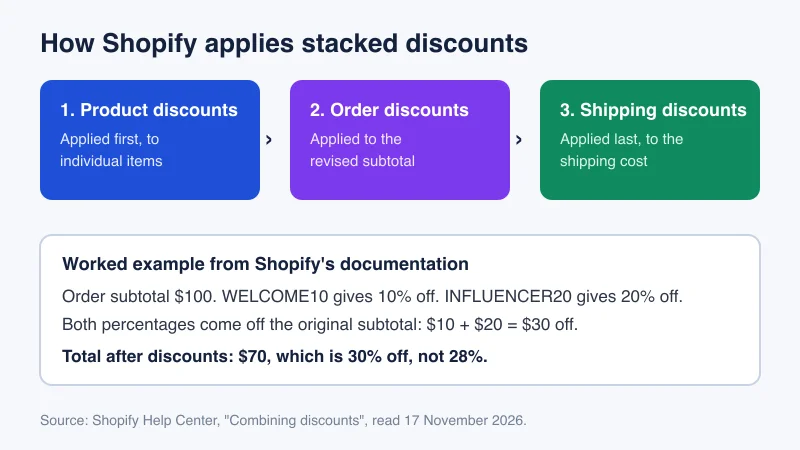
Shopify applies product discounts first, order discounts to the revised subtotal second and shipping discounts last. A customer can use a maximum of 5 product or order codes plus 1 shipping code on one order. In Shopify's example, 10% and 20% off a $100 subtotal totals $30 off (Shopify Help Center).
Stacking is where margin disappears. Shopify lets you choose which discount classes can combine, and then it follows its own order of operations.
The key points from Shopify's discount combinations page:
- Every merchant can combine order discounts with free shipping, product discounts with free shipping, and product discounts on separate items.
- Combining product discounts with order discounts, or two order discounts, is only for eligible merchants. Your store must not use any checkout.liquid customizations, and you must not use the Licensify app.
- Two percentage order discounts are both calculated on the original subtotal. They do not compound. 10% plus 20% is 30% off, not 28%.
- Discounts on Buy X get Y products can block further product discounts on those items for stores not on Shopify Plus.
- If discounts cannot combine, the customer gets the best one for their cart, and Shopify shows the message "Discount couldn't be used with your existing discounts" if they try to enter a second code that cannot stack.
- Discounts only combine on orders made through the Online Store, Storefront API and Shopify POS. They do not combine on external checkouts such as Facebook, Instagram or Google.
Our advice: switch combining off by default. Turn it on for one offer at a time, and test the worst case. Enter every code you have live into one cart and see what the total becomes.
How Much Can You Discount Before You Lose Money?
A discount costs more than its percentage suggests. At a 50% gross margin, a 20% discount cuts profit per order by 40% and needs about 67% more orders just to break even. This is LiquidBoost's own arithmetic, shown below, not a Shopify or industry statistic.
Margin math is the part most store owners skip. Here is the break-even for a product with a 50% gross margin (a $50 product that costs $25 to make and ship).
| Discount | New price | Profit per unit | Extra units needed to break even |
|---|---|---|---|
| 10% | $45.00 | $20.00 | 25% |
| 20% | $40.00 | $15.00 | 67% |
| 30% | $35.00 | $10.00 | 150% |
| 40% | $30.00 | $5.00 | 400% |
Break-even extra volume = discount ÷ (gross margin − discount). This ignores ad spend and fixed costs, which only make it worse.
Read the 30% row slowly. To make the same profit as full price, you need two and a half times as many extra orders. Few promotions deliver that.
So set your ceiling before you pick a number. Take your gross margin, subtract your target profit per order, and the remainder is the most you can give away. Then use the tools to stay under it: a minimum purchase, a product or collection limit and a use cap. If a code gets shared on a coupon site, those limits protect you.
For stores planning a big sale, our Black Friday discount strategy guide covers tiered offers and bundles in depth, and our free shipping threshold guide shows how to protect average order value without a percentage cut.
How Do You Get Customers to Use a Discount Code?
Shoppers abandon carts mostly for reasons a code cannot fix, but cost is the biggest fixable one. Baymard Institute found 40% of US abandoners, excluding people who were just browsing, cited extra costs such as shipping, tax and fees. Averaged across 50 studies, 70.22% of carts are abandoned.
A code only works if the shopper can find it and use it. Three tactics help.
Use shareable links. Shopify gives you a link in the form /discount/code, which applies the discount to the customer's next cart. According to Shopify's guidance on managing discounts, you can add ?redirect=/collections/sale to send the shopper to a specific page. The same discount can also be downloaded as a QR code. A link or QR code carries only one discount, and codes made by a third-party app may not get a link from your admin.
Show the code where the decision happens. Email and social posts get forgotten. A visible banner on the product or cart page does not. This is the job of a promo code display, and it stops the "go and search for a coupon" detour.
Fix what a code cannot. Baymard's research shows what drives people away once they are in the cart.
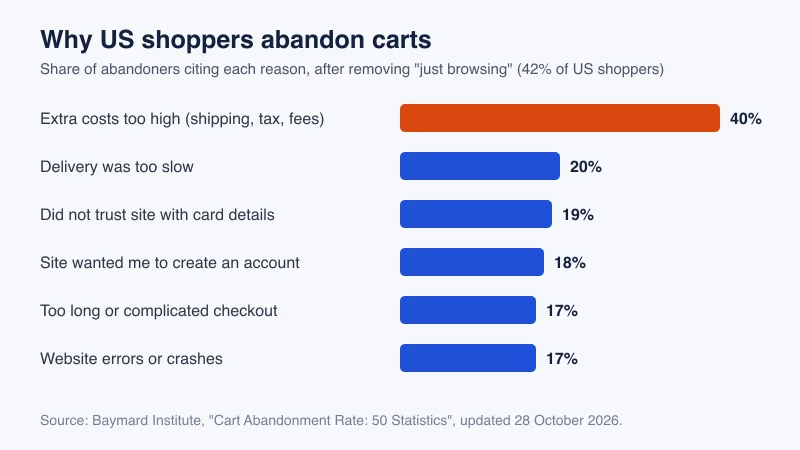
Extra costs lead by a wide margin, so a free shipping discount often beats a percentage code. The 20% on slow delivery, 19% on trust and 18% on forced account creation show that checkout friction costs sales no matter how large the discount is. Baymard also found 42% of US shoppers had abandoned a cart because they were "just browsing", a group no code will convert. Our abandoned cart guide covers the recovery side.
What Mistakes Make Shopify Discount Codes Fail?
The most common failures are codes with no limits, codes that leak to coupon sites, discounts that stack in ways you did not plan, and codes shoppers cannot find. Shopify supports date, use-count, minimum-order and product limits that prevent most of them. Each costs margin or conversions.
These mistakes follow directly from how Shopify's discount rules behave.
- No usage cap. A public code with no limit can be used by everyone, forever. Set a date range or use count.
- Combining switched on without testing. One generous order discount plus a shipping code plus an automatic sale can add up to more than you meant.
- Vague code names. A code like SAVE might collide with a code you made last year. Use names that carry meaning, such as WELCOME10, and avoid special characters, as Shopify recommends.
- Starting at the wrong hour. Time is set in your admin time zone, so a promotion for US shoppers can start hours early or late for them.
- Deleting and re-creating a one-per-customer code. Shopify notes that if you delete such a discount and add a duplicate, customers who used the old one can use the new one once. Edit instead of recreating.
- Never reading the report. Shopify's Sales by discount report shows what each code did. If you never open it, you cannot tell a good code from an expensive one.
When you want to go beyond what Shopify's discount tools do, such as showing a promo bar or a countdown to a code's expiry, you can add them with theme code. Our Liquid code examples show where to start.
Frequently Asked Questions
How do I create a discount code in Shopify?
Go to Discounts in your Shopify admin and click Create discount. Choose a type, select the discount code method, enter the code and value, then set eligibility, minimum purchase, usage limits and dates. Shopify supports up to 20,000,000 unique codes per store, so the limit is rarely a concern.
Can customers use more than one discount code on a Shopify order?
Yes, if you allow it. Shopify limits a customer to a maximum of 5 product or order discount codes and 1 shipping discount code on the same order. Each discount must have combining switched on for the classes involved. Otherwise the customer receives only the best single discount.
What is the difference between a Shopify discount code and an automatic discount?
A discount code is typed in by the customer at checkout. An automatic discount applies by itself when the cart meets your rules. Shopify allows up to 25 active automatic discounts per store, including app-based ones. Codes suit targeted audiences, while automatic discounts suit offers everyone should see.
Why is my Shopify discount code not working?
The usual causes are an expired date, a reached usage limit, a minimum order not met, products outside the eligible collection, or a clash with another discount. Shopify shows "Discount couldn't be used with your existing discounts" when two codes cannot combine. Also check the code is not a $0 or 0% value.
Can I share a Shopify discount code as a link?
Yes. In the discount's page choose Promote, then Get a shareable link. The link has the form /discount/code and applies the discount to the customer's next cart. You can add ?redirect=/collections/name to send shoppers to a specific page. Shopify also provides a QR code for the same discount.
Want the code to show where shoppers decide?
A discount code only helps if shoppers see it before they leave. LiquidBoost snippets cost USD 7.90 to 15.90, include a 14-day money-back guarantee, and install without a monthly app fee or an external script.
Display your active offer on product and cart pages with a tested snippet, and keep the sale on your own store instead of a coupon site.
Browse LiquidBoost's snippet marketplace →
One-time purchase per snippet. No monthly fees. 14-day money-back guarantee.