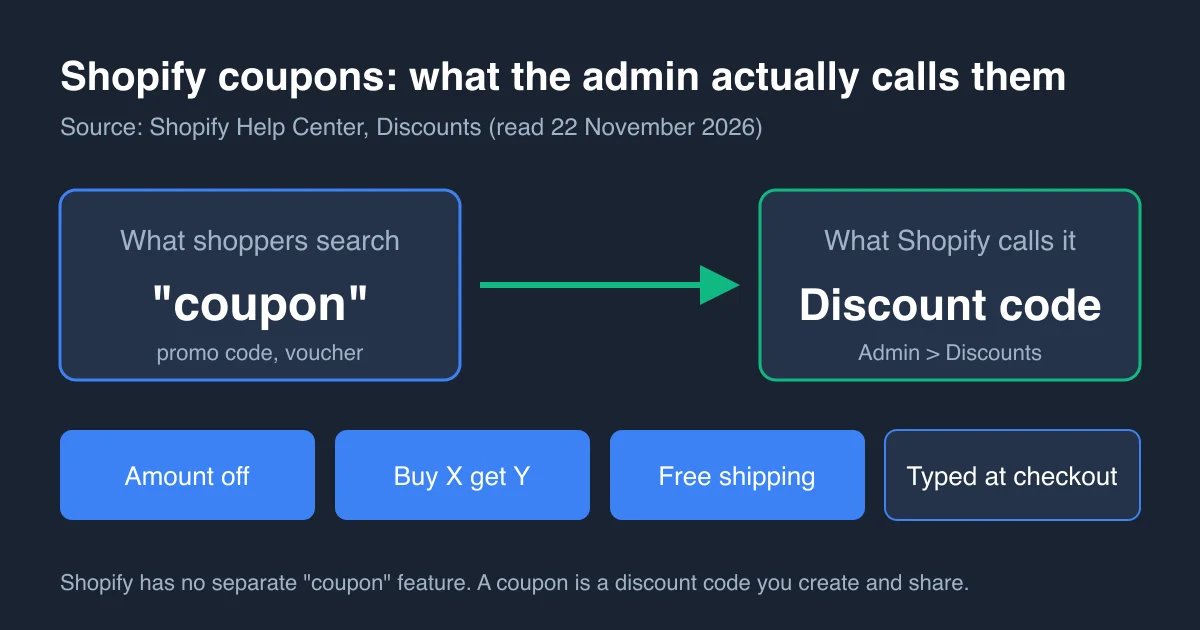
Shopify has no coupon feature.
That surprises many store owners. You will not find a "Coupons" menu in your admin, because Shopify calls them discount codes. This guide shows how to create a coupon, which kind to run for each goal, how to share it, what stacks with what and how to stop a coupon from eating your profit.
Every Shopify rule below comes from Shopify's own Help Center pages, which we read on 22 November 2026. Where a number is our own arithmetic, we say so. For the full setup walkthrough of the code itself, see our guide to Shopify discount codes. This post is about running coupons well.
What Are Shopify Coupons and Where Do You Create Them?
A Shopify coupon is a discount code: text such as WELCOME10 that a customer enters at checkout to receive a reduction you defined. Shopify's Help Center lists four discount value types for codes: a monetary amount, a percentage, buy X get Y, and free shipping. Codes work online and in person with Shopify POS.
Shopify says discount codes are "the most common type of discount method," according to Shopify's discount codes documentation. You make them in the Discounts section of your Shopify admin.
Shoppers still type "coupon," "promo code" or "voucher" into Google. So use the word coupon in your emails and banners if you like. Just know that inside Shopify, a coupon is a code with rules attached.
Shopify's discounts overview also lists two other tools that people confuse with coupons:
- Automatic discounts, which apply in the cart with no code.
- Sale prices, which you set on individual products.
A coupon is the only one of the three that the customer has to type in. That one fact drives most of the strategy below.
How Do You Create a Shopify Coupon Step by Step?
Go to Discounts in your Shopify admin, click Create discount, choose the type and the discount code method, enter the code and value, then set dates, usage limits, a minimum order and eligible customers. Shopify lets you configure five details per code: dates, use count, minimum order, eligible items and combining.
The setup takes about five minutes. These are the steps in order.
- Open Discounts in your Shopify admin and click Create discount.
- Pick a type: amount off products, amount off order, buy X get Y, or free shipping.
- Choose the Discount code method and type your code. Avoid special characters, because Shopify warns they can break the code in your checkout URL.
- Set the value, such as 10% or $5.
- Set who can use it, and what it covers.
- Add a start and end date, a usage limit and a minimum order.
- Choose which other discount classes it can combine with, then save.
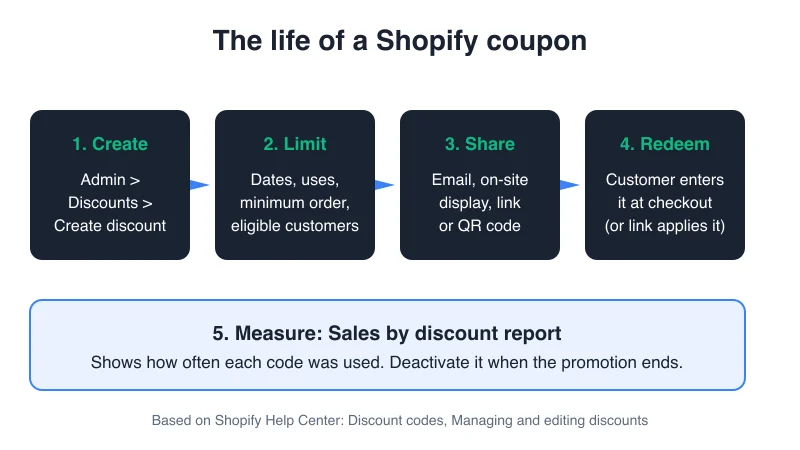
Shopify's documentation lists the configurable details as the dates the code is valid, how many times it can be used, a minimum order amount, which products, collections or variants it covers, and whether it combines with other discount classes.
One detail catches people out. If you set a start and end time, Shopify uses the time zone selected in your admin. A coupon for US shoppers can open hours earlier or later than you intended if your admin is set elsewhere.
Done? Open the Sales by discount report after a week. Shopify built it to show how often your codes are used.
Which Shopify Coupon Should You Run for Each Goal?
Match the coupon to the behavior you want. A first-order percentage code wins new buyers, buy X get Y raises cart size, and free shipping removes a shipping objection. Shopify supports three discount types: amount off, buy X get Y and free shipping, according to its Discount types documentation.
Most weak coupons start with a number ("let's do 20%") instead of a goal. Start with the goal.
Shopify's discount types page describes amount off (a percentage or a fixed amount), buy X get Y, and free shipping. Here is how we would map them to common store goals.
| Goal | Coupon to run | Why it fits |
|---|---|---|
| Win a first order | Percentage off, limited to customers with no orders | Simple to explain, easy to put in a welcome email |
| Raise cart size | Buy X get Y | The shopper adds an item to earn it |
| Remove a shipping objection | Free shipping | Shopify lets you exclude very expensive shipping rates |
| Move one slow product | Amount off that product or collection | Limits the margin you give away |
| Reward repeat buyers | Amount off, limited to a customer segment | Keeps the offer away from everyone else |
The first row relies on a Shopify feature worth knowing. In Shopify's guide to managing discounts, customer segments let you target people who have not purchased before, using a segment with number_of_orders = 0. Shopify identifies these customers at checkout by a valid email address or phone number.
What if you want tiers, such as 10% off $75 and 20% off $150? Shopify points to discount apps from the App Store or, on Shopify Plus, Checkout Blocks. Our comparison of Shopify discount apps covers the options.
How Do You Get Shopify Coupons in Front of Shoppers?
Share a coupon by email, show it on your store, or send a shareable link or QR code. Shopify says a shareable link can open your home page, a collection or a product page, and the discount then applies to the customer's next checkout cart. A link or QR code carries one discount only.
A coupon nobody sees earns nothing. Shopify's own documentation warns that forgotten discount codes might lead to cart abandonment.
Your main routes are below.
- Email. Send the code to a list. This is the route Shopify itself suggests, along with showing the code on your online store.
- Shareable link. In the discount's page, promote it with a link. Shopify describes the link as working for social media, emails and landing pages.
- QR code. Download it for receipts, displays or a retail counter.
- On-site display. Show the code in an announcement bar or on the cart page, so shoppers do not leave to hunt for one.
Per Shopify's managing discounts page, links and QR codes work only for active discounts. If a third-party app created the code, you cannot get a link or QR code for it from your Shopify admin.
Does your cart page show the coupon you just emailed? Shoppers who have a code and cannot find where to use it leave. Put your active offer on the page where they decide, using a LiquidBoost snippet. USD 7.90 to 15.90 one time. 14-day money-back guarantee. See the promo code display guide.
Can Customers Stack Shopify Coupons?
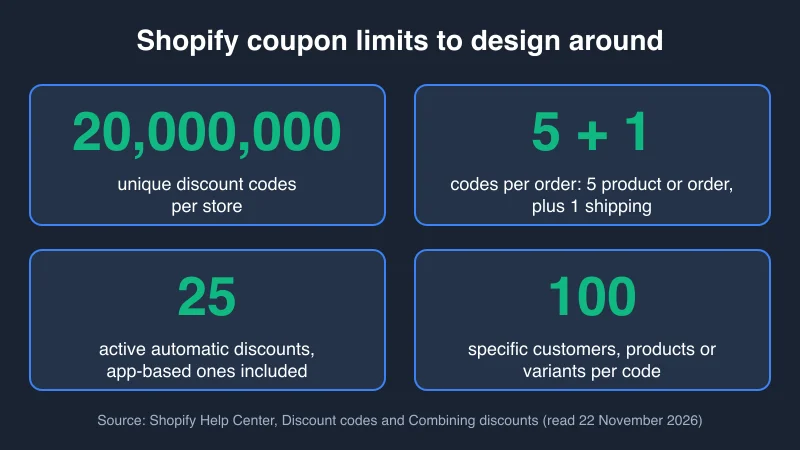
Yes, when each discount allows it. Shopify lets a customer use up to 5 product or order discount codes and 1 shipping discount code on one order. Every discount must have combining switched on for the classes involved. Otherwise the customer gets Shopify's message: "Discount couldn't be used with your existing discounts."
Stacking is where coupons quietly get expensive. A 15% welcome code, a free shipping code and an automatic sale can all land on one order.
Shopify's combining discounts page says all merchants can combine order discounts with free shipping, product discounts with free shipping, and product discounts on separate items. Combining product discounts with order discounts, or two order discounts, needs extra eligibility, such as no checkout.liquid customizations.
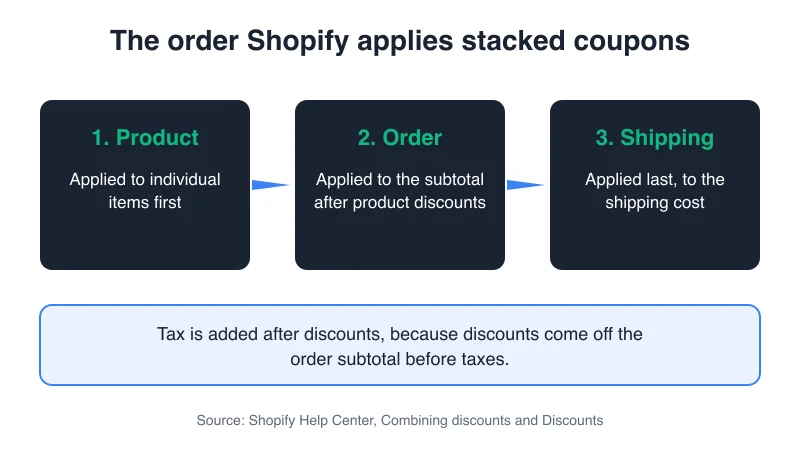
The order matters too. Shopify applies product discounts first to individual items, order discounts to the revised subtotal after that, and shipping discounts last.
So a 10% order coupon is worth less when a product coupon has already cut the subtotal. Test every combination you allow with a real cart before you send the email.
What Limits Does Shopify Put on Coupons?
Shopify caps a store at 20,000,000 unique discount codes, and one code can apply to up to 100 specific customers, products or variants. Automatic discounts are capped separately at 25 active per store, including app-based ones. These caps are rarely a problem, but the item limit can surprise large catalogs.
Know the ceilings before you build a big promotion.
According to Shopify's discount codes documentation, a code that targets more than 100 specific customers, products or variants returns an error: "Item entitlements exceeded max number." The 20,000,000 limit applies per store, and Shopify says third-party apps cannot raise it.
The 25-discount cap is on automatic discounts, which Shopify's automatic discounts page says can be amount off, free shipping or buy X get Y.
Two behaviors are not obvious:
- A discount code entered at checkout does not apply to post-purchase offers, according to Shopify. If you run a post-purchase upsell, your coupon will not discount it.
- A "one per customer" code is tied to that discount. Shopify notes that if you delete it and create a duplicate, customers who used the old one can use the new one once. Edit the code instead of recreating it.
How Much Can a Shopify Coupon Cost You?
A coupon cuts profit by far more than its percentage suggests. In our own arithmetic, a $50 product with $30 of total cost earns $20 profit; a 20% coupon drops that to $10, so you need 100% more orders to earn the same total profit. Check break-even before you publish any code.
This section is our arithmetic, not a market study. The example is hypothetical: a $50 product with $30 of total cost per order (product, shipping, fees), so $20 profit at full price.
| Coupon | Profit per order | Orders needed to match $20 profit |
|---|---|---|
| None | $20.00 | 1.00x |
| 10% off | $15.00 | 1.33x (33% more) |
| 15% off | $12.50 | 1.60x (60% more) |
| 20% off | $10.00 | 2.00x (100% more) |
| 25% off | $7.50 | 2.67x (167% more) |
The formula is simple. Profit per order is price minus cost minus the coupon, and break-even volume is old profit divided by new profit.
Swap in your own numbers. Shopify applies discounts to the order subtotal before tax, so your tax math is unaffected, but shipping and payment fees still come out of what is left.
This is why free shipping or buy X get Y often beats a deep percentage. They give you a way to raise the cart size, which pays for the discount. Our Black Friday discount strategy guide applies the same margin thinking to peak season.
How Do You Stop Shopify Coupons Leaking to Coupon Sites?
Limit every public coupon by date, use count and audience, and prefer private routes such as email segments. Shopify supports date ranges, usage limits, customer segments (up to 100 per code) and specific customers. A code with no limits can be used by anyone who finds it, for as long as it stays active.
Coupon leakage means your code ends up on a coupon aggregator or a browser extension, and every shopper gets a discount meant for a few. This is the problem behind much of the demand for "shopify coupons" searches. Shoppers go looking, so assume they will.
You cannot remove your code from the internet. You can limit what a leaked code does.
- Set an end date. A code that expires cannot circulate forever.
- Cap the uses. A total use limit and a one-per-customer limit both help.
- Restrict the audience. Under Eligibility, Shopify lets you pick all customers, specific customers, markets or customer segments. A welcome code limited to customers with no orders is useless to returning shoppers.
- Use automatic discounts for public sales. There is no code to leak. Shopify says automatic discounts apply when the cart meets the conditions.
- Deactivate when done. A shopper who enters a deactivated code sees "Unable to find a valid discount matching the code entered," so the code simply stops working.
- Show your own code. If shoppers see an offer on your page, fewer leave to search for one. Our guide to promo code display covers that approach.
There is a trade-off. A tight coupon is safer, but a shopper who tries a code and sees an error may leave. So make the error rare: put the real end date on the banner, and remove the banner when the code is deactivated.
For the abandonment side of this problem, our abandoned cart guide shows where a coupon belongs in a recovery sequence and where it does not.
Frequently Asked Questions
How do I create a coupon code in Shopify?
Open Discounts in your Shopify admin and click Create discount. Choose a type, select the discount code method, enter the code and value, then set eligibility, a minimum purchase, usage limits and dates. Shopify supports up to 20,000,000 unique discount codes per store, so the limit rarely matters.
Does Shopify have coupons or only discount codes?
Shopify has discount codes, which people also call coupons or promo codes. A customer enters the code at checkout to get an amount off, a buy X get Y deal or free shipping. Shopify also offers automatic discounts, which need no code, and the three methods differ in who triggers the offer.
Can I use more than one coupon on a Shopify order?
Yes, if the discounts are set to combine. Shopify allows up to 5 product or order discount codes and 1 shipping discount code on one order. If two codes cannot combine, the customer sees "Discount couldn't be used with your existing discounts" and cannot apply the second one.
Why is my Shopify coupon not working?
Usual causes are an expired date, a reached usage limit, a minimum order not met, products outside the eligible collection, or a clash with another discount. A deactivated code shows "Unable to find a valid discount matching the code entered." Check dates against your admin time zone, too.
How do I give a Shopify coupon to only new customers?
Create a customer segment where number_of_orders equals 0, then select that segment under the discount's eligibility. Shopify identifies these customers at checkout by a valid email address or phone number. A discount code can have up to 100 customer segments attached.
Want your coupon to show where shoppers decide?
A coupon only converts when shoppers see it before they leave. LiquidBoost snippets cost USD 7.90 to 15.90 each, include a 14-day money-back guarantee and install without a monthly app fee, so your offer stays on your own store.
Add your active offer to product and cart pages with a tested snippet. No developer needed.
Browse LiquidBoost's snippet marketplace →
One-time purchase per snippet. No monthly fees. 14-day money-back guarantee.